

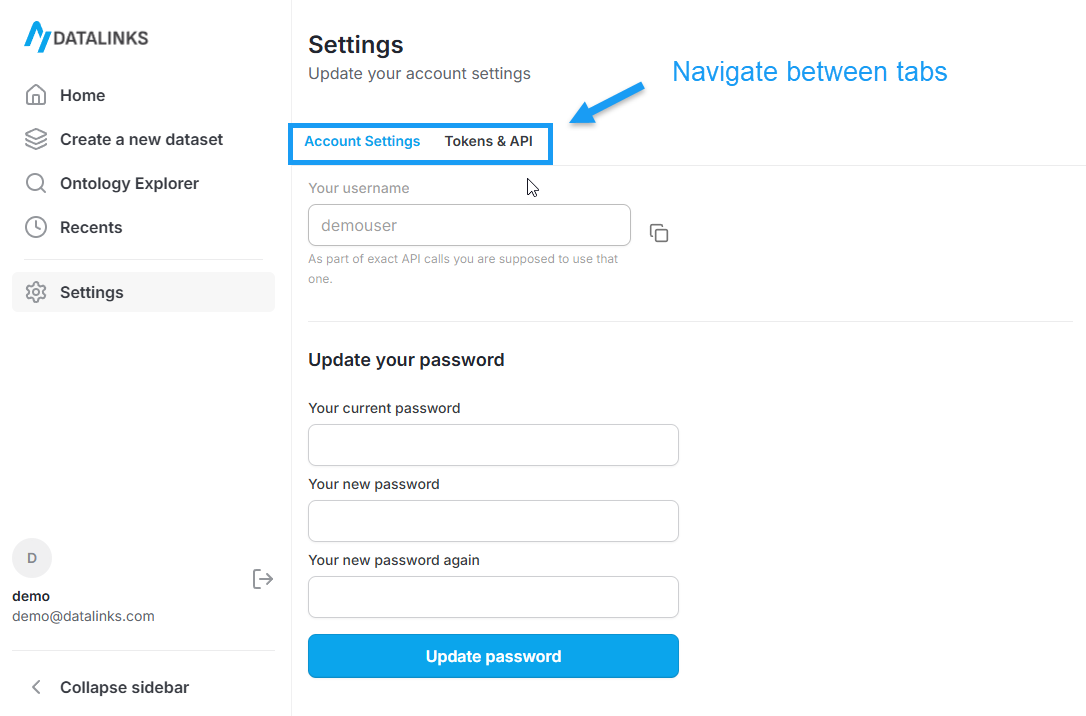
Page layout
The Settings page is organized into two tabs:- Account settings
- Tokens
Account settings
Use Account settings to manage your login credentials.Update your password
This section lets you change the password associated with your account. Fields- Current password: Your existing password
- New password: The password you want to switch to
- Confirm new password: Re-enter the new password to confirm
- Enter your current password.
- Enter a new password.
- Re-enter the new password to confirm.
- Click Update password.
Tokens
Tokens are used to authenticate API requests. Each token represents a secure credential that can be used in your applications or integrations. When no tokens exist, this page shows an empty state with a shortcut to create one.Create a new token
Select Create a new token to generate an API token. On the Create a new token screen, provide the following:- Token name: A descriptive name to help you recognize the token later
- Expiration date: An optional expiration date for the token
See How to get an API token for detailed instructions.
Managing tokens
From the Tokens tab, you can:- View existing tokens
- Add new tokens
- Remove tokens that are no longer needed
Security notes
- Keep tokens private and store them securely.
- Rotate tokens regularly and remove any that are no longer in use.
- Use password updates if you believe your account credentials may be compromised.