

Page layout
The interface is organized into two main sections: a left navigation panel and a central workspace.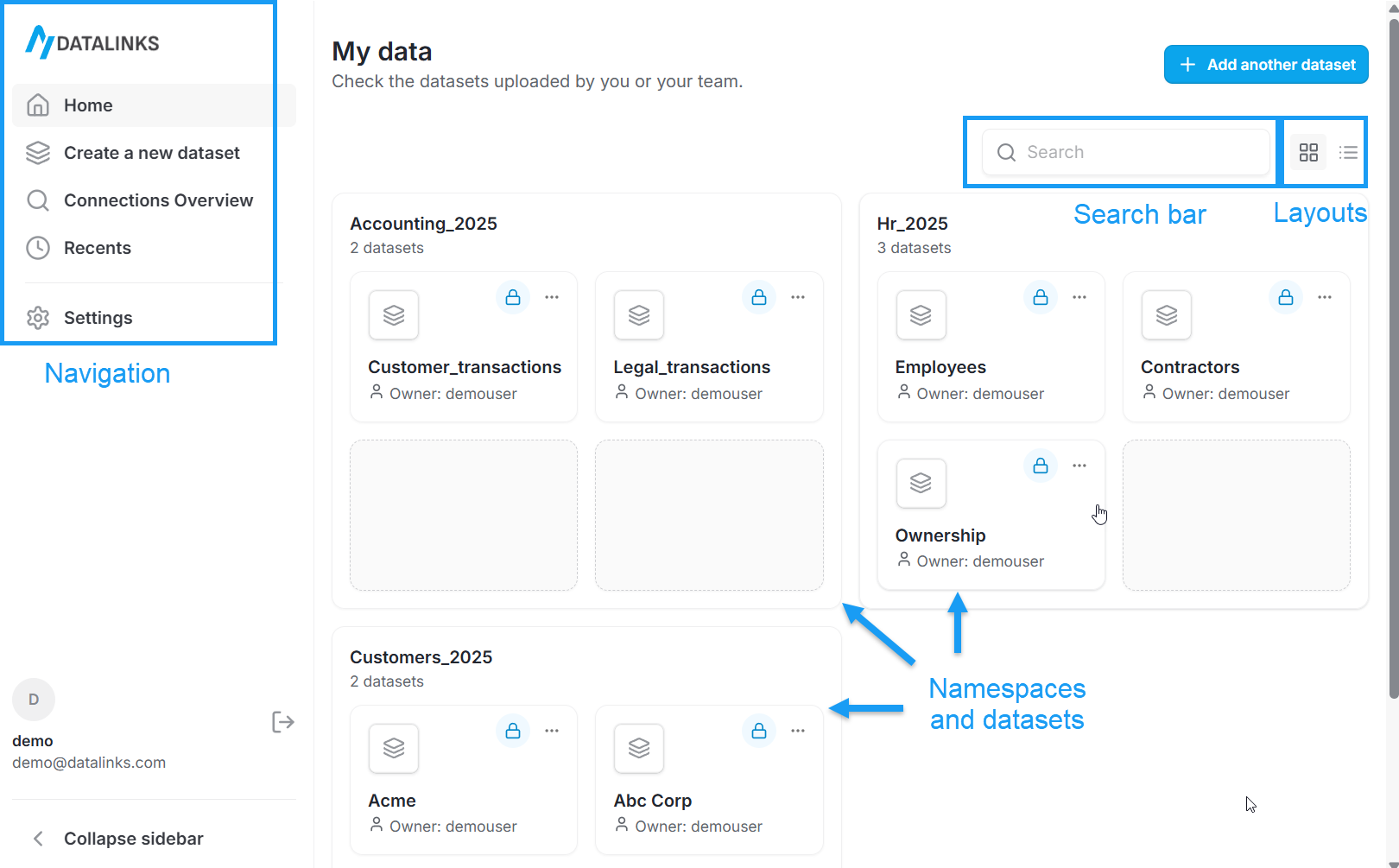
Left navigation menu
The navigation menu provides quick access to key areas of the platform.- Home: Returns you to this main dashboard from anywhere in the application.
- Create a new dataset: Opens the workflow for uploading or building a new dataset.
- Connections Overview: Gives you access to semantic relationships and linked entities once your data has been interconnected.
- Recents: Helps you pick up where you left off by listing items you viewed or edited recently.
- Settings: Lets you manage personal preferences, credentials, and related account details.
Central workspace: namespaces and datasets
The main area of the Home page focuses on the data available to you and your team.Namespace groups
Data is presented in grouped sections. Each group represents a namespace, which acts as a container for related datasets. Namespaces help teams organize collections of data that belong to a shared project or theme. Each namespace card displays:- The namespace name
- The number of datasets it contains
- The datasets themselves, shown as individual tiles
- Permissions indicators, such as lock icons when access is restricted
- A menu for namespace-level actions
Dataset tiles
Within each namespace, datasets are displayed as separate tiles. Each tile includes:- A dataset icon
- The dataset name
- The owner or creator of the dataset
- A permission indicator if the dataset is restricted
- An options menu for dataset actions